
Drop it like a torrent.
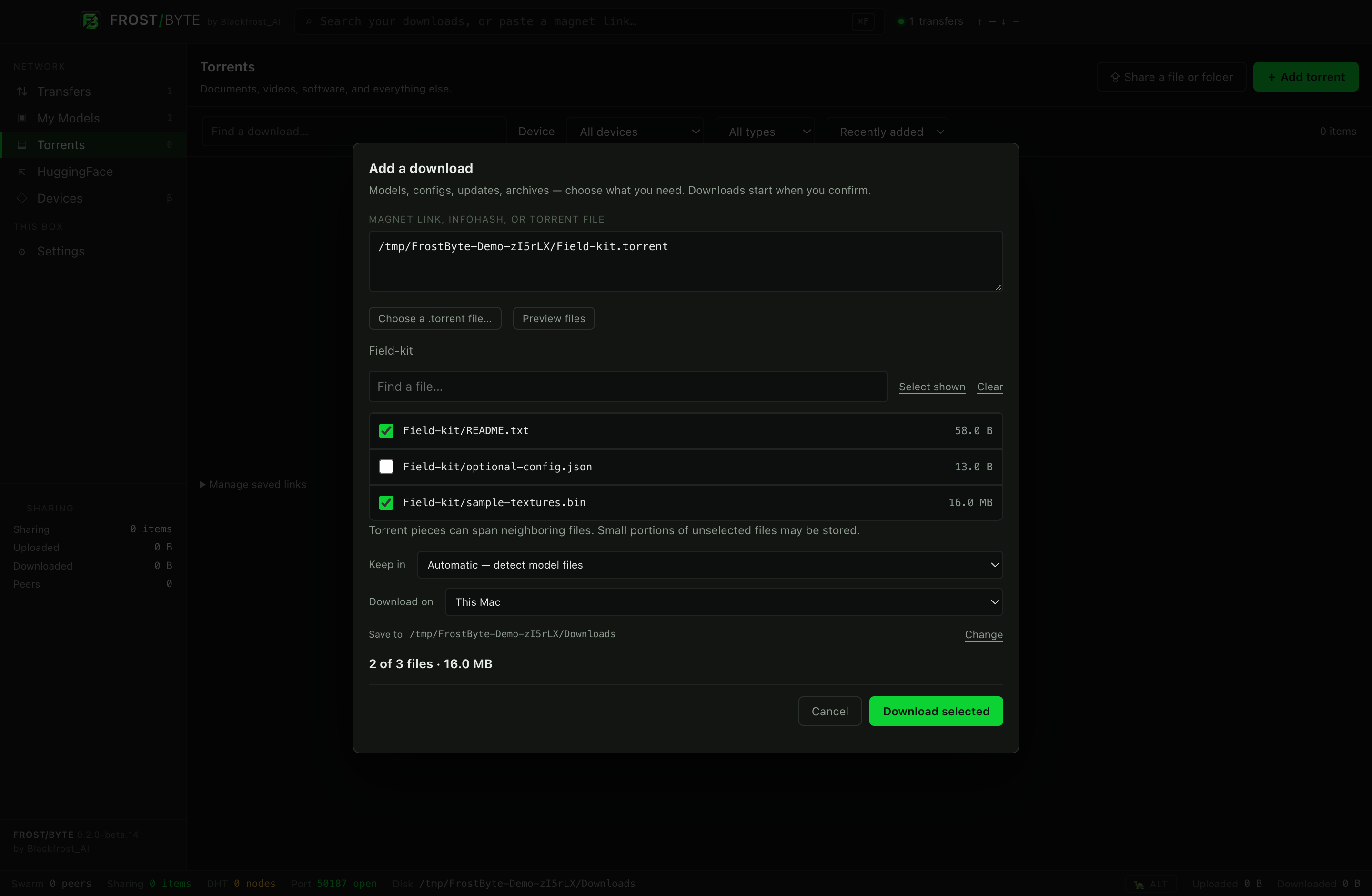
Drag in a .torrent file or magnet link. Review the file list and choose what to download before anything starts.
Models are welcome. So are configs, updates, archives, and ordinary files.
 FROST/BYTEFile sharing. With a fresh coat of frost.

FROSTBYTE 1.0 / COMMUNITY RELEASE
The new Blackfrost theme brings frosted glass, glacial light, crisp Manrope typography, and optional snowfall to your peer-to-peer desktop.
Bulk hide, remove and share controls, plus portable magnet-link and CSV exports. Destructive actions still ask.
Device dashboards, permission-based LAN discovery and support for existing WireGuard tunnels. No copying private keys or changing VPN routes.
No app analytics or diagnostic uploads. Feedback opens GitHub only when you choose it. Peer and service connections still exchange necessary network data.
Community source publication is upcoming. Updates and pull requests will be managed regularly by Blackfrost AI/SI. Source remains private until publication.
See the Blackfrost interface · Send feedback on GitHub
Community 1.0 is available now under Apache-2.0. Download for Mac, Windows or Linux. The interface image uses an isolated test profile, not a user’s library. Typography: Manrope / SIL OFL.
YOUR FILES. YOUR MACHINES. YOUR CALL.
Meet FrostByte. A desktop home for torrents, model downloads, and that very large file you actually need.
Find a model. Drop a magnet or IPFS link. Grab just the config. Download to your Mac, Windows PC, or Linux desktop—or let another Mac or DGX handle it.
Available now: Apple silicon Mac · Windows x64 · Linux x64 · v1.0.0
PICK YOUR SOURCE
Drag in a .torrent file or magnet link. Review the file list and choose what to download before anything starts.
Models are welcome. So are configs, updates, archives, and ordinary files.
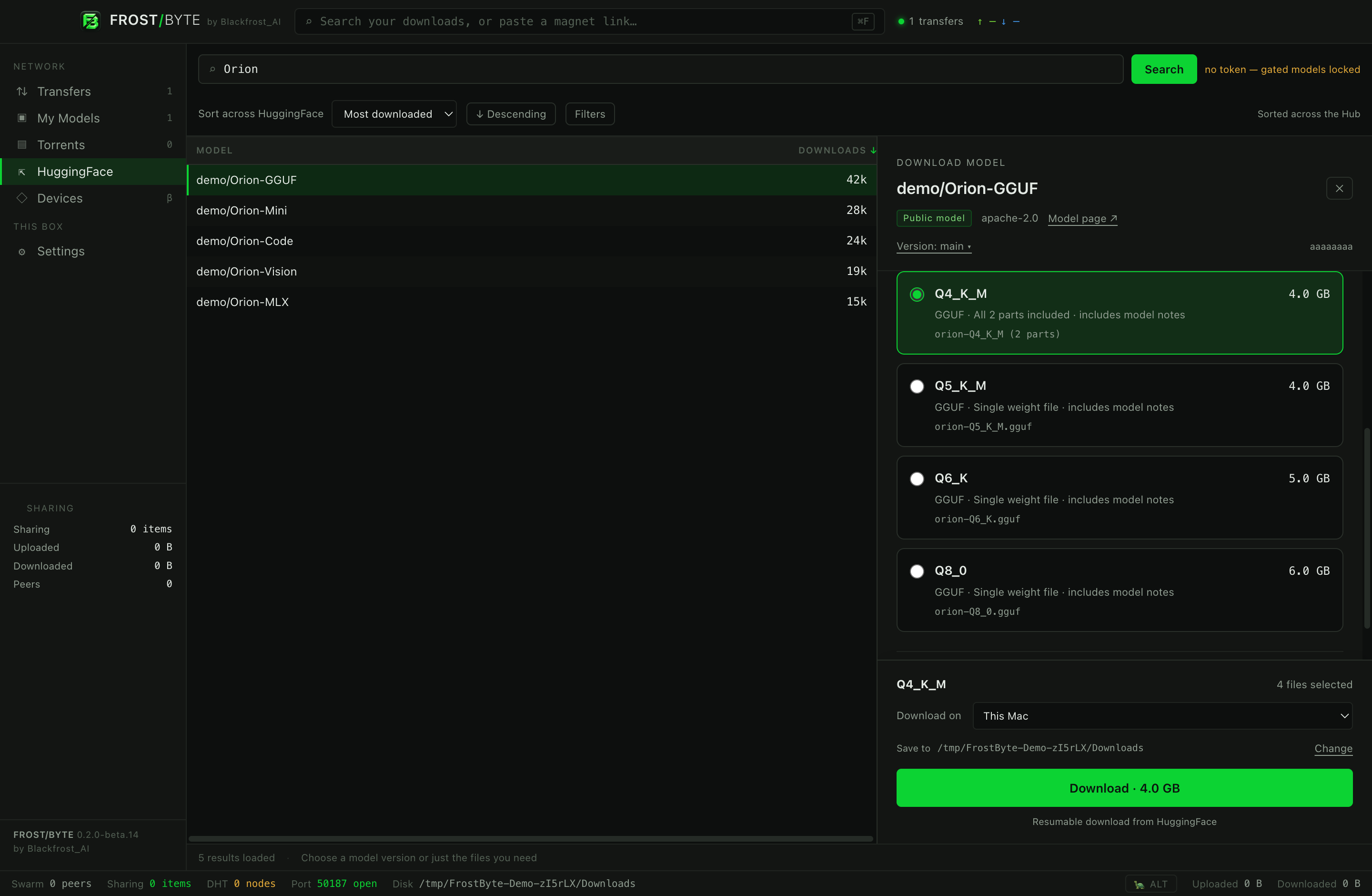
Search HuggingFace, sort across the Hub, and pick a model version or just the files you need.
GGUF choices, grouped split files, and quick config selections put you in control. Save your HuggingFace token to use authenticated metadata and file requests with your account’s access and download service.
Save Macs and DGX machines together. Devices shows the detected model, CPU, GPU and memory with real product photos on white backgrounds. Each download uses one internal or mounted external folder.
Companions work when your controller disconnects. A Mac must remain awake and logged in. Frigid is not required.
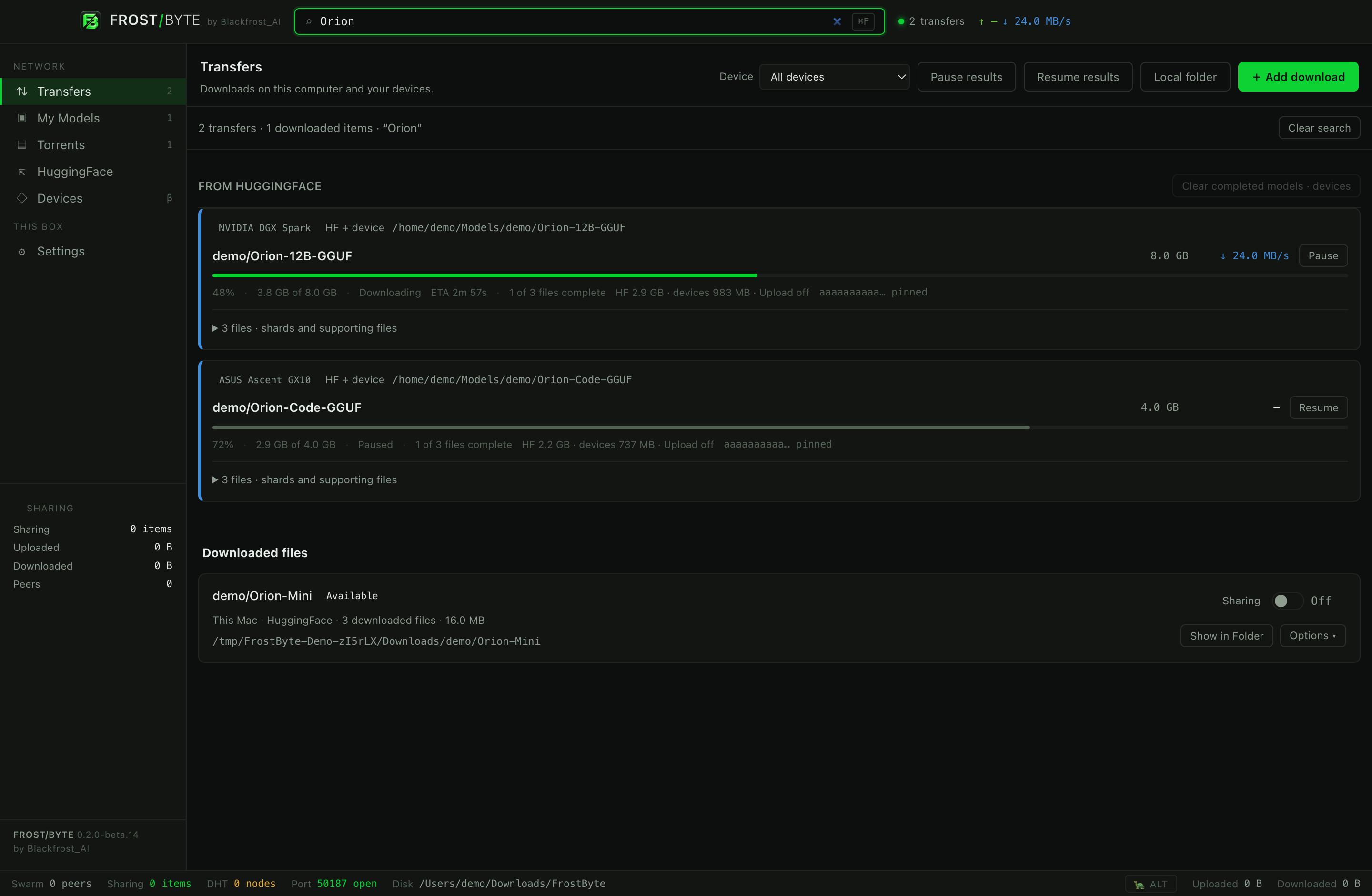
Pick a model. Review a torrent. Watch a transfer. Here is the desktop app doing its thing.
The original tour below shows earlier packaged beta screens in an isolated demo profile. See the Read Me for the AEON Orbit pictures. Hub listings, companion connections and remote model progress are simulated; local transfer and sharing use real test peers. Speeds are not benchmarks. Click a picture for full size.
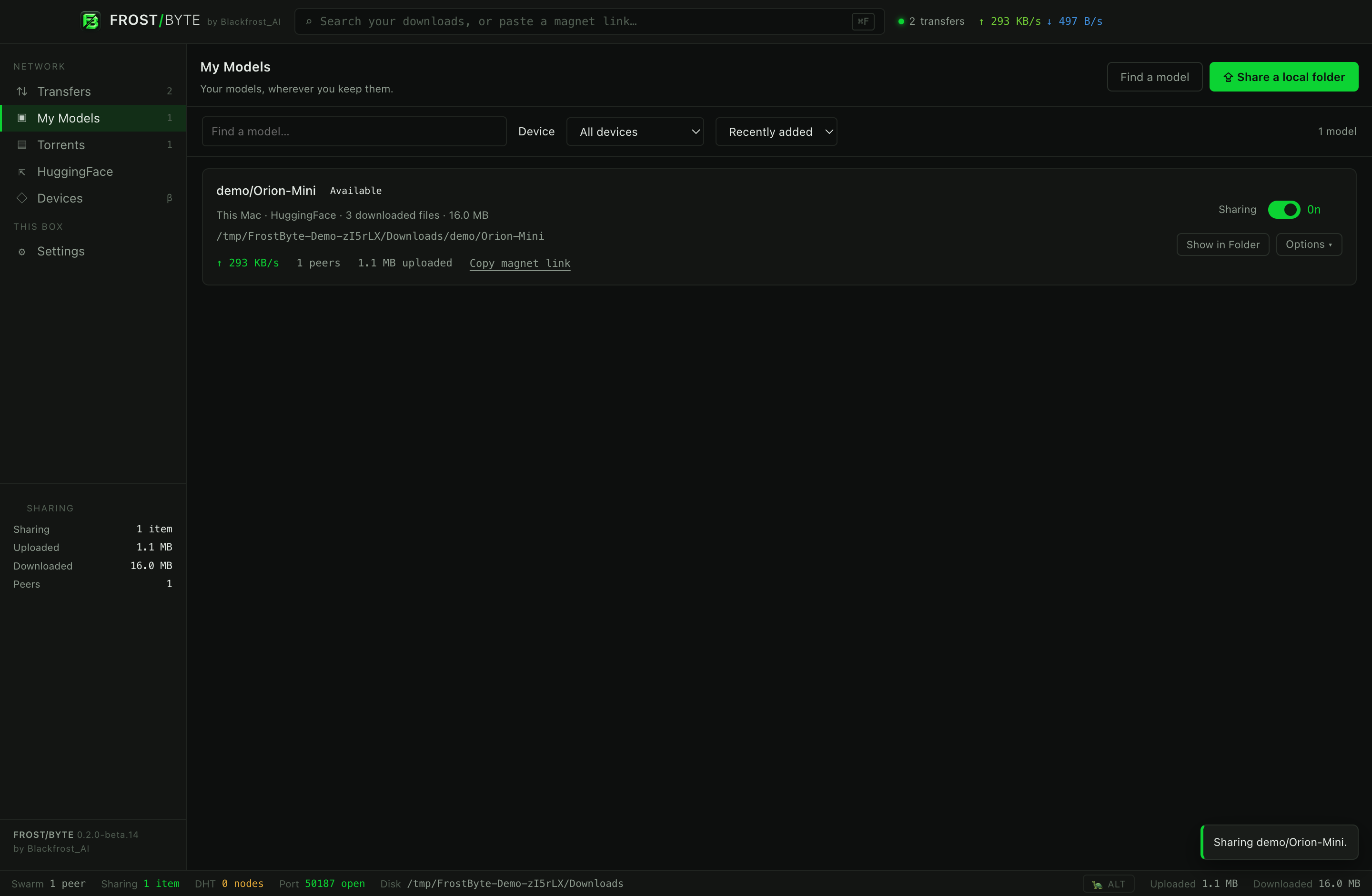
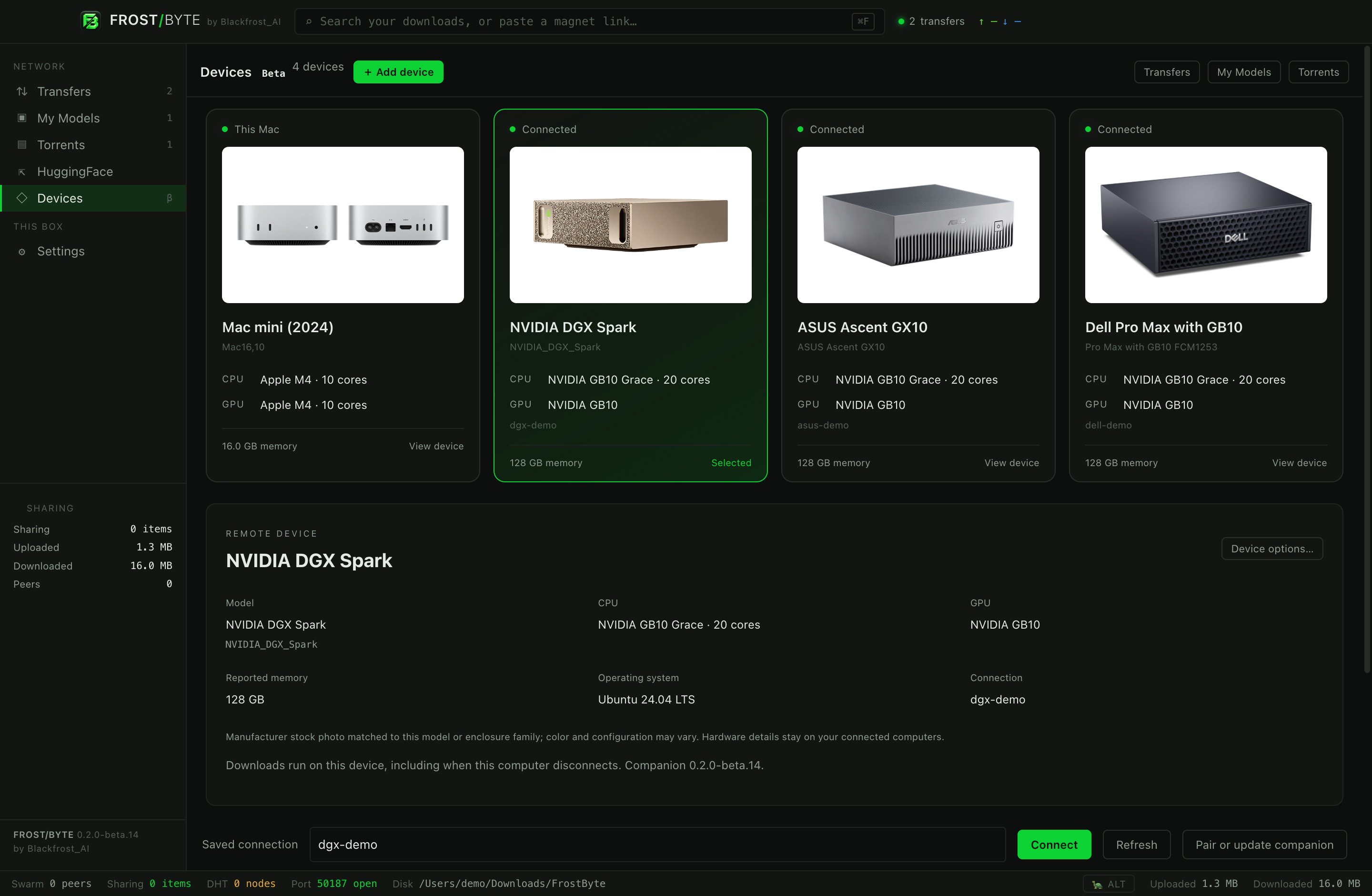
FROM FIRST DOWNLOAD TO SHARING
The full guide explains Hub filters and file versions, torrent selections, My Models, device setup and storage, bandwidth, privacy choices and troubleshooting.
Start your first download · Connect a device · Understand privacy
Free downloads for Apple silicon Mac, Windows x64 and Linux x64. No invite code, account or email is required. There is no website acceptance checkbox or download-session cookie.
Community software is licensed under Apache-2.0. Source publication is upcoming; source remains private until then.
All six downloads, file sizes and checksums · Linux Debian package · License & terms · Privacy notice
| Desktop app | macOS · Apple silicon (ARM64) Windows · x64 Linux · x64 (AppImage or Debian) |
|---|---|
| Download sources | BitTorrent files, magnet links, HuggingFace and IPFS |
| Connected devices | Choose authorized devices and folders. LAN and existing WireGuard overlays are added only with your approval; FrostByte does not copy WireGuard private keys or change routes. |
| Privacy | No app analytics or automatic reports. Optional feedback opens GitHub without attaching app data. |
| License | Apache-2.0 for Community 1.0, with third-party notices preserved. |
Current public build: 1.0.0. Blackfrost glass, bulk library actions, device dashboards and approved network discovery — available on all three desktop platforms.
IPFS caches use additional space on the state drive, and IPFS bandwidth is separate from torrent limits. Speeds depend on available sources, account service, peers, network, and storage.
Mac builds are Developer ID signed but not notarized; Windows builds are unsigned. Linux packages have GPG-signed checksums. Intel Mac, Windows ARM64, and Linux ARM64 desktop installers are not included. Read the installation guide and management walkthrough.
No. It is designed with model downloads in mind, but its BitTorrent support also handles ordinary files, archives, configs, and updates. You choose the source and the files.
No. FrostByte downloads directly to your Mac, Windows PC, or Linux desktop. Mac and DGX companions are optional; guided setup installs them through Devices. Frigid is not required.
Open Devices → Add device. Enter its address and account login, or use an existing SSH connection. Verify its fingerprint, review the detected machine and choose a folder before installing the companion. Your setup password is not saved. A remote Mac needs Remote Login, Python 3 and a logged-in desktop account; it does not need Docker.
Yes. Choose a download folder on your Mac, PC, or Linux desktop, or add a folder on a drive mounted on a connected device. Choose one device and one folder before each download.
No. FrostByte searches and downloads through the HuggingFace API. Public models can be browsed without a token. Save a token for your account’s authenticated access and download service; restricted models may also require publisher approval.
Download the Mac DMG, open it, and drag FrostByte into Applications. Quit an older copy before replacing it, then open FrostByte from Applications. The ZIP is an alternative containing the same app.
The Mac app is Developer ID signed and has not been notarized by Apple. macOS may block it or require your approval. Review Apple’s guidance and verify the download checksum. Keep system protections enabled and contact support if you are unsure.
Choose the setup EXE for a per-user installation, or extract the Windows ZIP and run FrostByte.exe from that folder. Setup does not request administrator elevation. The ZIP does not install shortcuts or file/link associations.
The Windows app is not Authenticode signed, so Windows may show a publisher or security warning. Keep system security protections enabled and contact support if you are unsure about a build.
On an x64 Debian-family system, run sudo apt install ./FrostByte-1.0.0-linux-x64.deb. For the portable build, run chmod +x FrostByte-1.0.0-linux-x64.AppImage and open it; if FUSE is unavailable, use --appimage-extract-and-run.
Before installing, verify the Blackfrost GPG signature and your package’s SHA-256 checksum. The package containers have no embedded signature. The AppImage requires supported unprivileged namespaces; the Debian package installs the packaged sandbox helper. The app refuses an unsafe fallback. A functional desktop Secret Service such as GNOME Keyring through libsecret is required to save tokens or device keys.
Start with a small download. Choose a destination, confirm the files appear in My Models or Torrents, restart the app, and check that they remain available. If you use a companion, try its selected storage, device controls and reconnection. Test sharing only with files you have permission to distribute.
Choose Help → Send feedback or Settings → Privacy & Feedback to open GitHub. Nothing from the app is attached. Describe what happened only if you choose to submit an issue. Do not include tokens, passwords, private keys or sensitive file details. You can also contact support@blackfrostai.com.
Visit FrostByte on GitHub for official download links, the user guide, bug reports, feature requests and setup questions. Star the repository to show your support, follow an issue for updates, or read the public roadmap.
GitHub reports and attachments are public. Keep invite codes, credentials, device addresses and private download details out of them. For private feedback, contact support directly. Suspected vulnerabilities have a separate private reporting link in the repository.
FrostByte 1.0 has no app analytics, automatic diagnostic reports or in-app feedback collection. Optional feedback opens GitHub without attaching application data. Local records, peers, selected services and website hosting still involve ordinary data and network requests. See the privacy notice.
The Windows installer registers FrostByte as an option and preserves existing defaults. Choose it through Windows Default apps or Open with when you want to use it. Sources sent to FrostByte open a review; a transfer starts only after you confirm.
Choose your platform at the download desk. No invitation, account, acceptance form or email signup is needed. Verify the signed checksums before installing.
Community 1.0 is licensed under Apache-2.0. Community source publication is upcoming, with updates and pull requests managed regularly by Blackfrost AI/SI.
Keep the good parts of file sharing.
Leave the dial-up behind.